
CM Batch Filename Changer1.1.3 - Download
You'll be able to download in few seconds.
Publisher Description
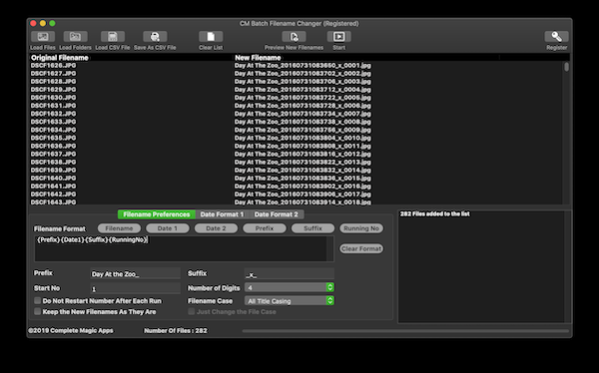
CM Batch Filename Changer came about from years of getting a simple to use but yet comprehensive filename changer for the Mac. This app was born from the need to find a simple way to batch rename photos but evolved to support any kind of files on the Mac.
It uses a two step method which lets you build the filename format using the built-in filename format editor which comes with quick macro to ensure that you can add dates and running numbers with padding to the filenames, preview the changes and once you are happy with it, do the actual change.
Not only that, it comes with the date format editors too. Actually two of them so you can set up different date formats using the Date Builders. You can use either the Creation Date, Modification Date or EXIF Date.
We understand that you might want to use your own custom filenames for each file and you can either manually update the New Filename properties on the list or use a CSV file from your app or your favorite Spreadsheet to generate the list. That is also covered.
The app would power up its two renaming threads to speed up the process and you can get a list of renamed files within seconds or minutes.
When you perform a filename change, the modification and some times the creation dates would change depending on how you perform the change. CM Batch Filename Changer would retain the file original creation and modification date so you do not have to worry.
About CM Batch Filename Changer
This File & Disk Management program is available in English. It was last updated on 29 September, 2026. CM Batch Filename Changer is compatible with the following operating systems: Mac.
The company that develops CM Batch Filename Changer is iRedSoft Technology Inc. The latest version released by its developer is 1.1.3.
The download we have available for CM Batch Filename Changer has a file size of 34.6 MB. Just click the green Download button above to start the downloading process. The program is listed on our website since 2021-11-30 and was downloaded 0 times. We have already checked if the download link is safe, however for your own protection we recommend that you scan the downloaded software with your antivirus. Your antivirus may detect the CM Batch Filename Changer as malware if the download link is broken.
How to install CM Batch Filename Changer on your Windows device:
- Click on the Download button on our website. This will start the download from the website of the developer.
- Once the CM Batch Filename Changer is downloaded click on it to start the setup process (assuming you are on a desktop computer).
- When the installation is finished you should be able to see and run the program.
Program Details
System requirements
Download information
Pricing
Version History
version 1.1.3
posted on 2021-11-30
Performance Improvement
version 1.0.2
posted on 2019-05-17
Initial Release
Disclaimer
External Download
We do not host CM Batch Filename Changer on our servers. We did not scan it for viruses, adware, spyware or other type of malware. This app is hosted by the software publisher and passed their terms and conditions to be listed there. We recommend caution when installing it.
The external download link for CM Batch Filename Changer is provided to you by apps112.com without any warranties, representations or guarantees of any kind, so access it at your own risk.
If you have questions regarding this particular app contact the publisher directly. For questions about the functionalities of apps112.com contact us.
